A small local Python app that connects to Ollama, streams generated tokens into a Streamlit UI, and surfaces inference metrics as they happen. The goal was to make the prefill/decode split, TTFT, and tokens/sec concrete — by watching them happen live and benchmarking them across repeated runs.
The companion post, What Happens Between the Prompt and the Response, covers the conceptual layer: the two-phase execution model, the KV cache, and how llama.cpp and vLLM approach the problem differently.
⚡︎ Stack
| Layer | Tool |
|---|---|
| Language | Python 3.12, managed by uv |
| UI | Streamlit — server and frontend in one process |
| HTTP client | httpx — streaming SSE from Ollama’s /api/generate |
| Inference runtime | Ollama → llama.cpp → Metal (Apple Silicon) |
| Model | llama3.2:latest (~1.9 GiB GGUF, Q4_K quantization) |
📁 Repo Structure
llm-inference-explorer/
├── .python-version               # Python 3.12, pinned by uv
├── pyproject.toml                # dependencies: streamlit, httpx
├── compose.yml                   # Ollama via Docker (Linux/CI — not for M3)
├── Makefile                      # make dev → uv run streamlit run app/streamlit_app.py
├── docs/
│   └── ollama-serve-log-flow.md  # annotated first-run log walkthrough
└── app/
    ├── streamlit_app.py          # entry point — UI and session state
    ├── ollama_client.py          # HTTP wrapper around Ollama's REST API
    └── benchmark.py              # repeatable performance measurement module
app/ is a plain directory, not a Python package — no __init__.py needed because all three files import from the same directory. It would only become a package if imports were needed across directory boundaries.
🚀 How to Run
# 1. Clone the repo
git clone https://github.com/mehtaz23/llm-inference-explorer
cd llm-inference-explorer

# 2. Install and start Ollama natively — required for Metal GPU on M3
brew install ollama
brew services start ollama

# 3. Pull a model
ollama pull llama3.2

# 4. Start the app
make dev
Open http://localhost:8501 in your browser.
The compose.yml is there for portability on Linux and in CI, but explicitly not recommended on macOS. Docker Desktop on macOS runs a Linux VM with no access to Apple Metal — inference falls back to CPU-only, and the throughput difference is severe.
🖥️ What the UI Shows
The app has two interaction modes: a generate panel and a benchmark panel in the sidebar.
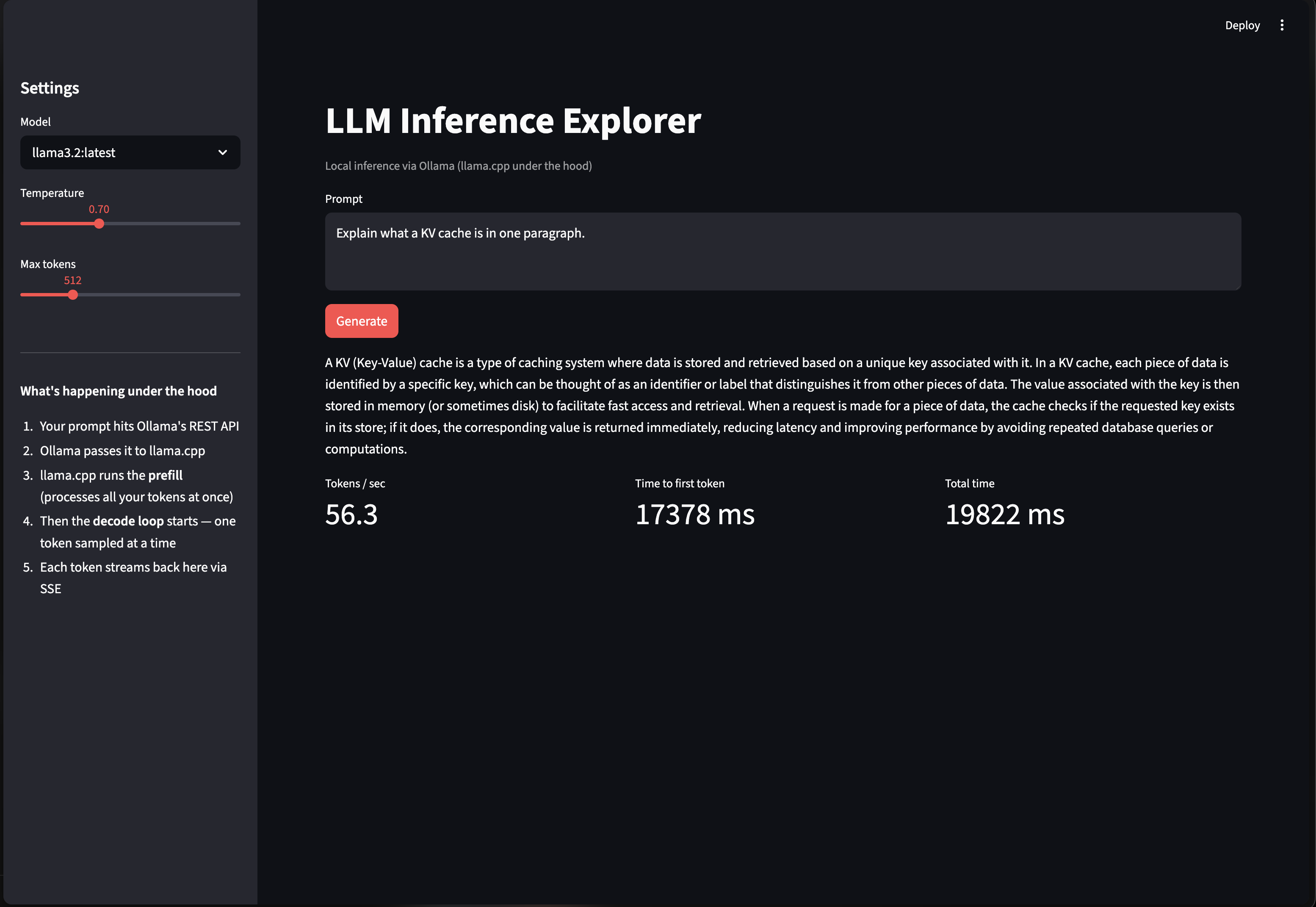
Generate mode (main panel):
- Prompt text area pre-filled with “Explain what a KV cache is in one paragraph.”
- Model selector, temperature slider (0.0–2.0), and max tokens slider (64–2048) in the sidebar
- Output streams token by token with a blinking cursor (
▌) while the decode loop is running - On completion, three metrics render below the output: tokens/sec, time to first token, and total duration
These map directly to the inference concepts from the blog post. TTFT reflects prefill cost — the time spent processing your prompt before a single token is generated. Tokens/sec is decode throughput — how fast the autoregressive loop is running.
Benchmark mode (sidebar):
- Runs slider (2–10) and a “Run benchmark” button
- Sends the same fixed prompt N times at
temperature=0— deterministic output, consistent token count per run, fair comparison - Results persist in
st.session_stateso changing the model dropdown or adjusting sliders after a run doesn’t wipe the table - The model name is stored alongside the result, so the label stays accurate even if you switch the dropdown after the fact
- Displays: avg tokens/sec, avg TTFT, min/max tps, and a per-run breakdown table
📋 First Run: What the Logs Show
docs/ollama-serve-log-flow.md in the repo is an annotated walkthrough of what ollama serve logs on first startup — what each phase means, what GPU discovery looks like on Apple Silicon, and why the first inference request is always slow.
The generate screenshot above was captured on a cold start with llama3.2:latest and shows a TTFT of 17,378 ms — roughly 17 seconds before the first token appeared. That number isn’t the model being slow at inference. It’s the model loading into GPU memory combined with Metal JIT-compiling its compute shaders on the first forward pass. From the log walkthrough:
“Metal JIT-compiles compute shaders on the first forward pass, adding roughly 8–12 seconds of one-time overhead. From the second request onward, generation runs at full throughput.”
Once the model is warm and the shaders are compiled, that cost disappears entirely. Run a benchmark immediately after that first cold generation and you get a completely different picture.
📊 Benchmark Results — llama3.2:latest on M3 Pro
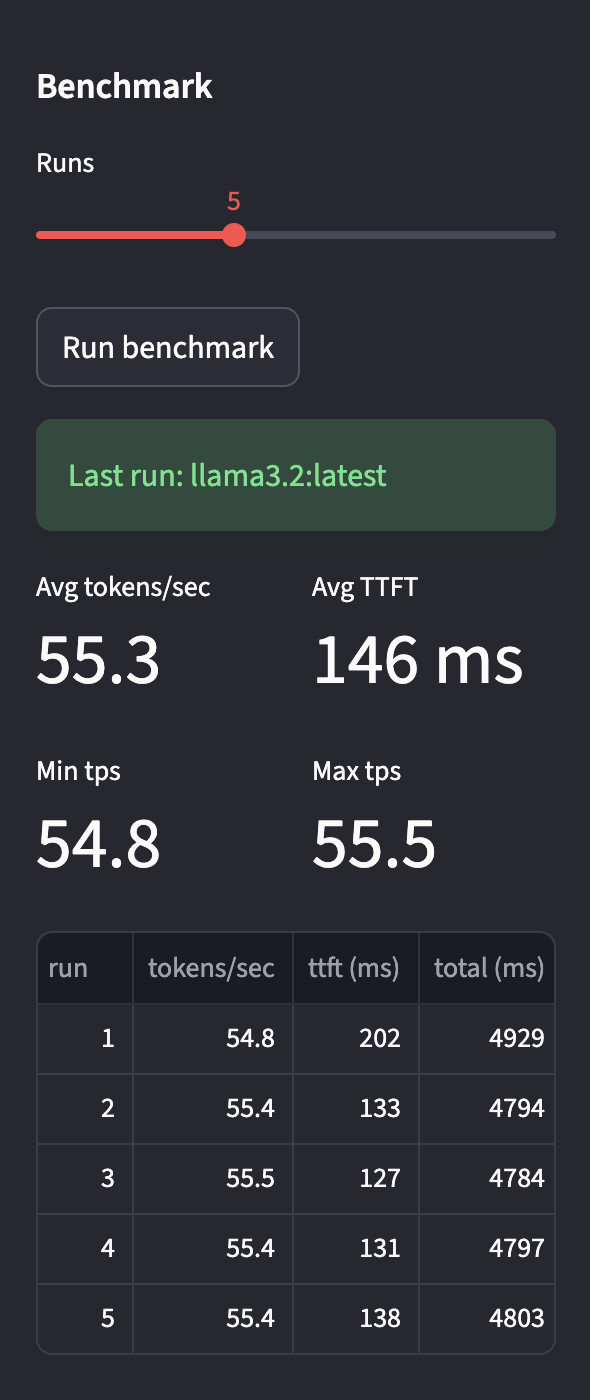
5 runs on an M3 Pro (16 GB unified memory), llama3.2:latest (Q4_K, all 29 layers offloaded to Metal):
| run | tokens/sec | ttft (ms) | total (ms) |
|---|---|---|---|
| 1 | 54.8 | 202 | 4929 |
| 2 | 55.4 | 133 | 4794 |
| 3 | 55.5 | 127 | 4784 |
| 4 | 55.4 | 131 | 4797 |
| 5 | 55.4 | 138 | 4803 |
| avg | 55.3 | 146 | 4821 |
A few things stand out from these numbers.
Throughput is remarkably stable. The spread across five runs is 54.8–55.5 tps — less than 2% variance. On a system where model weights and KV cache all live in the same unified memory pool and every layer is on the GPU, the decode loop is running the same compute graph at the same memory bandwidth ceiling on every step. There’s no PCIe transfer, no host-device copy, no fragmented allocation to vary the timing.
Run 1 TTFT (202ms) is elevated vs runs 2–5 (127–138ms). Even in a warm benchmark, the first call has slightly higher latency before settling. This is the first pass through the decode loop reaching steady state — a smaller echo of the same warm-up effect seen on cold start.
The cold start delta. The generate screenshot shows 17,378ms TTFT on a cold first call. The warm benchmark average is 146ms. That’s a 119× difference, and it’s almost entirely model loading time plus Metal shader compilation — one-time work the runtime never has to repeat while Ollama stays resident. brew services start ollama is the practical answer: keep the process alive, keep the model warm, and the cold start cost becomes irrelevant to normal use.
🧠 Lessons Learned
Temperature doesn’t affect throughput. My assumption going in was that higher temperature would slow things down — more randomness, more computation. It doesn’t work that way. Temperature only scales the logit distribution before the softmax; the actual sampling step is cheap regardless of value. Throughput at temperature=0.0 and temperature=2.0 is identical in the metrics.
Determinism matters for benchmarking. The benchmark module runs at temperature=0 specifically because deterministic output means the same number of tokens are generated on every run, keeping total duration comparisons apples-to-apples. Variable output length would add noise that drowns out the signal.
st.session_state is doing real work here. Without explicitly persisting the benchmark result and the model name together in session state, switching the model dropdown after a run would wipe the table. Storing the model name alongside the result is what lets the UI display “Last run: llama3.2:latest” accurately even after the dropdown has been changed.
A warm Ollama process changes the shape of the problem entirely. When Ollama stays resident, the model stays loaded in memory between requests. That’s the direct cause of the stable per-run numbers. If the process had to cold-load the model on every request, the benchmark would look nothing like what’s shown above. Running Ollama as a background service isn’t just convenient — it’s the correct operational model for any interactive use.